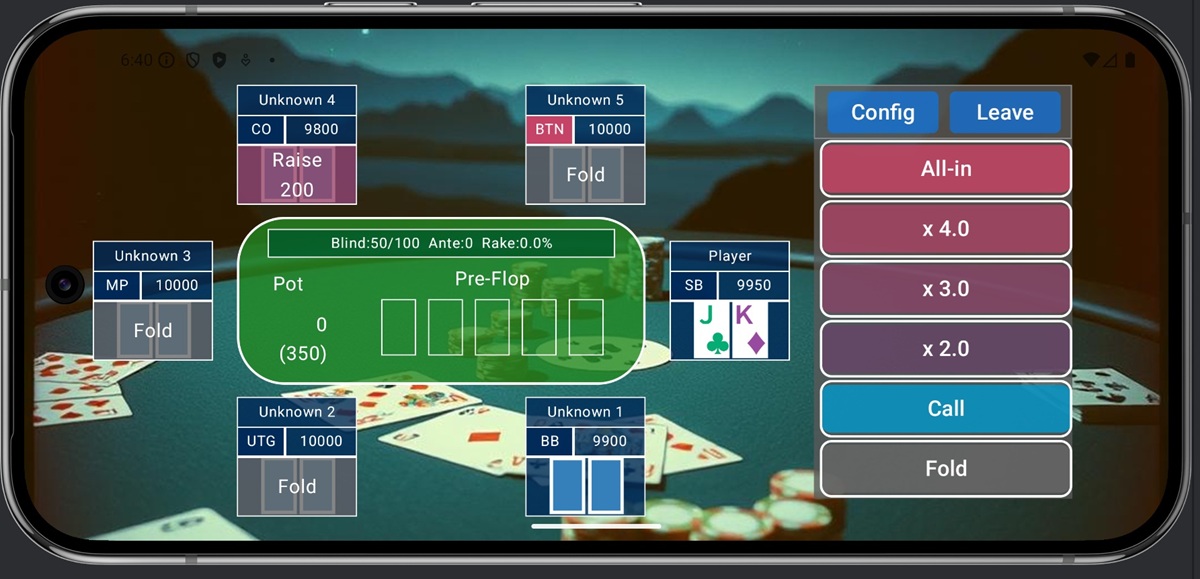
1. Game Menu Screen
Pressing the Game button on the menu screen displays the following screen.
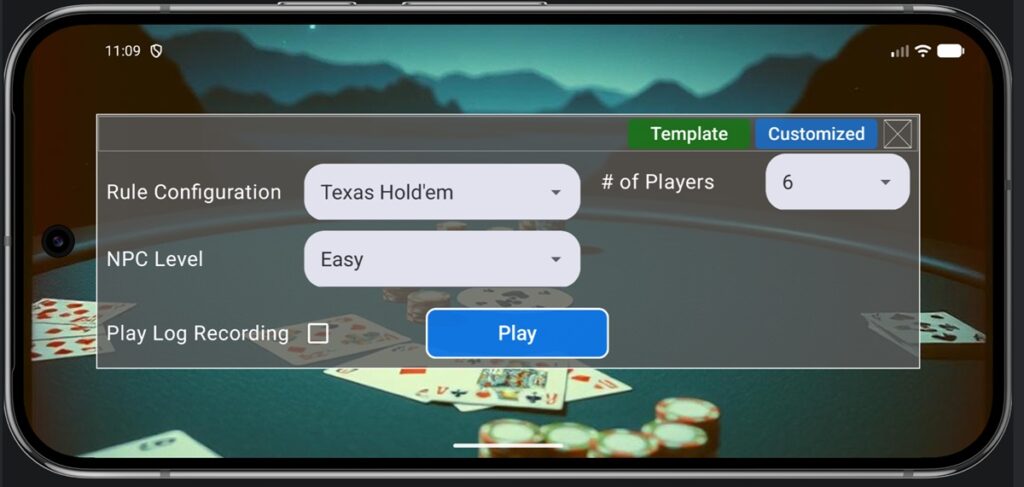
In this application, when playing a game, you can choose from two settings: “Template,” which lets you select a game with only basic settings, and “Customized,” which allows you to configure the game rules in detail.
In “Template” mode, you can play a game known as “Ring Game,” where the sole objective is to win as many chips as possible. You can select from the following options:
- Rule Configuration: Game rules such as poker hand ranking criteria and number of cards dealt
- NPC Level: Sets the strength of the NPC opponents. Choose from four levels: Easy, Normal, Hard, and Expert.
- # of Players: The number of players at the table
- Play Log Recording: Select whether to save your play history for AI learning (In this game, you can play against an algorithm (AI) that has learned from your own play history as an opponent.)
In “Customized” mode, in addition to Ring Game, you can also play “Sit & Go”—a game where players compete to finish in a qualifying position to avoid running out of chips—as well as “AOF,” a game where you can only choose between “All-in” or “Fold.” Tapping “Customized” on the menu bar will take you to the following screen.
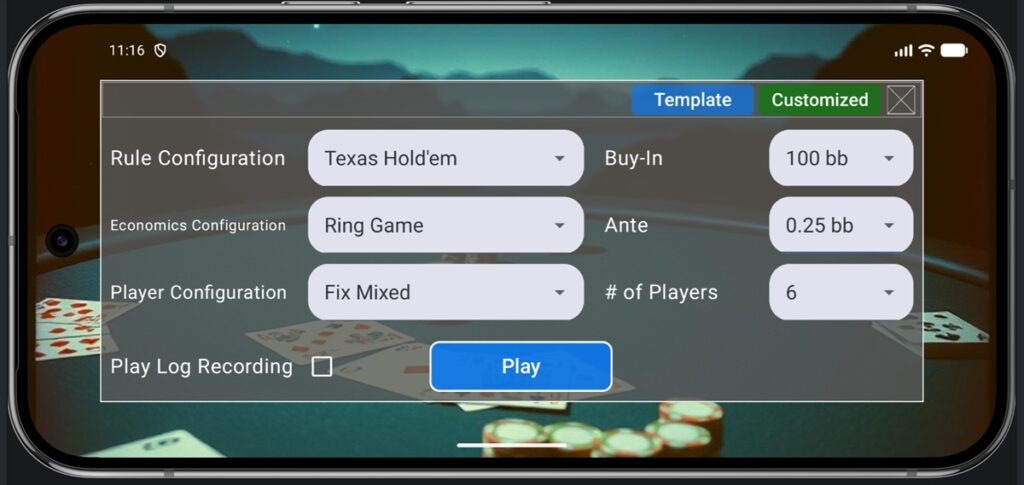
You can select the following items as settings:
- Rule Configuration: Game rules such as poker hand ranking criteria and number of cards dealt
- Economics Configuration: Rules concerning chips and betting methods, such as whether it’s a Ring Game or Tournament (S&G), and stack and ante amounts
- Player Configuration: Settings for what kind of NPCs you play against
- Buy-in: Specifies the initial stack size.
- Ante: Specifies the ante.
- # of Players: The number of players at the table
- Play Log Recording: Select whether to save your play history for AI learning (In this game, you can play against an algorithm (AI) that has learned from your own play history as an opponent.)
In this game, users can freely configure each item, but they can also use the settings prepared by the system (default). Here, we briefly explain the various default settings. Games with widely known rules are registered as defaults, allowing play without detailed user configuration.ules are registered as defaults, allowing play without detailed user configuration.
2. Rule Configuration
The default rule configurations provided are as follows. Rule explanations for each game are available on the official website. You can also check the rule settings for each game from the Game Settings screen.
| Texas Hold’em | Short Deck Hold’em | Omaha Hold’em |
| Omaha HiLo | 7 Cards Stud | 7 Cards Stud HiLo |
| Super Hold’em | Joker as a Bug | Joker Wild |
| Deuces Wild | One-Eyed Jacks | Lowball |
| 5 Card Omaha | 5 Card Omaha HiLo | 6 Card Omaha |
| 6 Card Omaha HiLo | Fix Limit Hold’em | Flop Start Texas Hold’em |
| Turn Start Texas Hold’em | 3 Card Poker | |
Additionally, as a special feature unique to this game, you can play games where the rules are randomly generated, preventing players from knowing the rules beforehand. You can enjoy highly challenging games where you must deduce the rules themselves through several rounds of play. Three game types are available, differing in the degree of randomness.
- Random Mild: Compared to standard poker rules, 2 to 4 elements are randomly modified. Changes may involve the number of cards dealt, hand composition rules, hand strength rankings, or designating specific cards as wild cards. On average, these games tend to follow poker rules, resulting in slightly modified gameplay.
- Random Moderate: Compared to standard poker rules, multiple elements undergo random rule changes. Guessing the rules becomes significantly harder, often resulting in rules that seem unrecognizable as poker. On average, the game tends to remain one where inferences from poker rules are useful, though accurately grasping the exact rules might sometimes be difficult.
- Random Chaos: Almost all rules undergo random changes. Rules are often adopted that bear little resemblance to poker’s original rules. This means rule changes like a combination of cards that looks like nothing but high cards being judged as a straight flush are possible, making it an extremely difficult game to predict the rules.
Because rules are generated randomly, they may seem nonsensical, but all games are generated within the scope of rules definable by this app. Refer to Chapter 5 and beyond for how users can define games. The number of possible rule combinations generated at each level is as follows:
- Random Mild: Approximately 10,000 combinations
- Random Moderate: Approximately 100 million combinations
- Random Chaos: Approximately 1 trillion combinations
3. Economics Configuration
Poker games like Texas Hold’em can be broadly categorized into the following three types:
- Ring Game
- Sit & Go (Single Table Tournament)
- MTT (Multi Table Tournament)
Ring Games are standard poker games where players compete purely to win more chips from other players, aiming to accumulate the largest stack. In this application, there is a cap on the amount of chips that can be won, making the goal to reach the cap faster (it is also possible to play almost limitlessly by setting a larger cap). Optimal strategies in poker vary significantly based on stack size and Ante, but you can play games with various settings.
Sit & Go is a game where the objective is to survive the longest without losing chips. Unlike Ring Games, the Blind values gradually increase over time. Consequently, the amount of chips you must compulsorily put in gradually increases, making survival progressively harder. The winner is determined when the last player remains, ending the game.
MTT involves running multiple Sit & Go tables simultaneously. As the number of surviving players decreases, tables merge to continue the game, repeating this process until the last player remains. Participation can range from dozens to thousands of players, making it a large-scale tournament-like game. This application only supports MTT in Multi Play mode; you cannot play MTT games from the Game button.
4. All-in or Fold (AOF)
This game features a distinctive rule: you can play All-in or Fold (AOF), where your choices are limited to either going All-in or folding. In All-in or Fold, losing once means losing all chips, so it’s typically a game format that doesn’t allow continuous play like a tournament. However, this game incorporates rule modifications to enable repeated play in an AOF format, similar to a tournament.
Specifically, it introduces the concept of a Bankroll alongside the Stack, allowing players to separate the Stack contributed to the AOF from the chips kept on hand. That is,
Bankroll = Stack in the table + Chips on hand
This represents the distinction between the Stack invested in a single AOF and the chips retained on hand. For example, in a tournament, losing an AOF and having your Stack reach 0 does not result in elimination; elimination occurs only when your Bankroll reaches 0. This allows for a format where repeated play is possible even in AOF. In AOF, the Bankroll is displayed as the player’s total chips instead of the Stack.
5. Player Configuration
Configure NPC opponents. You can specify table size and opponent tendencies (Loose or Tight, Aggressive or Passive). NPC tendencies can also be randomized to make their actions harder to predict, and you can specify information like NPC composition ratios. The main options are as follows:
- Fix 6 TAG: Play against 6 Tight Aggressive (TAG) players.
- Fix 6 LPA: Play against 6 Loose Passive (LPA) players.
- Fix 9 Mixed: Play against 9 NPCs randomly assigned from 4 patterns: TAG, LAG, LPA, TPA.
- Fix 6 Caller: Play against 6 opponents who always choose to Call.
- Float Mixed: NPCs randomly leave and join, making the player count variable. NPCs of the four patterns (TAG, LAG, LPA, TPA) are randomly placed.
The game settings screen allows you to specify various configurations, such as changing the number of players joining the table or altering NPC behavior patterns. Refer to Chapter 5 and Chapter 7 for specific configuration methods.
6. Game Screen
When the game starts, the following screen appears.

Basic operation involves selecting one of the Action buttons on the right to proceed with the game. Action buttons can be selected from the Config screen. Pressing the Config button displays the following screen.

The Game Language setting allows you to configure the language displayed within the game screen (this can be set independently from the app’s overall language). Raise and Bet buttons can be selected and placed with different sizes. Up to 7 buttons can be selected. Settings are automatically saved when the screen is closed.
Pressing the Leave button ends the game and returns you to the menu screen. In a standard game, this immediately ends the game. In Multi Play mode, the connection to the server is terminated after one hand is completed, so please wait until the current hand ends.
7. HUD and Statistics
This application saves your action history, and you can view these statistics on the screen. To view this information, tap your seat on the game screen.
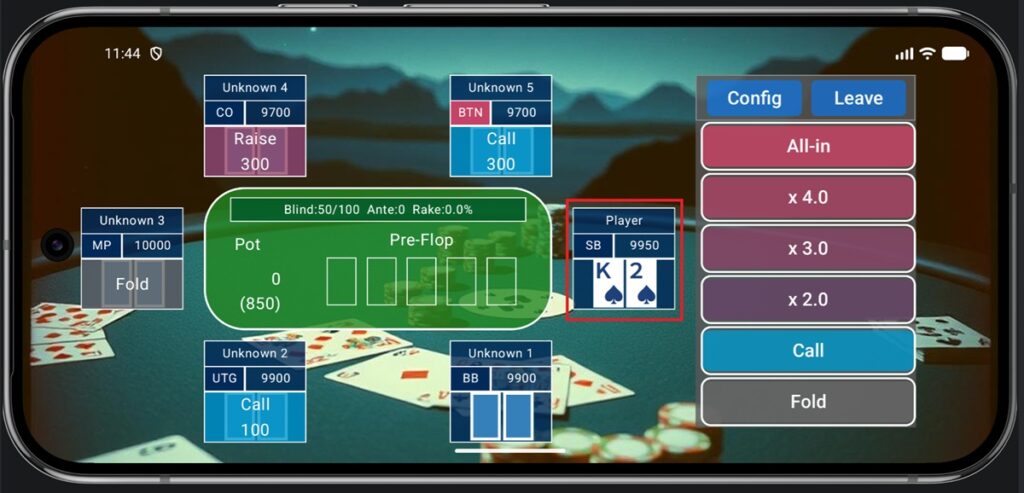
Tapping it will display the following screen.
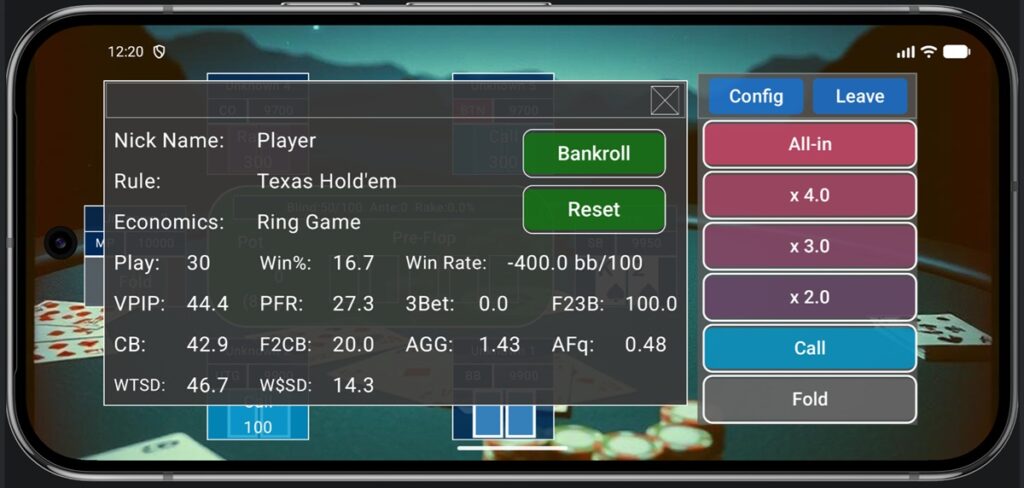
The meanings of each statistical item are as follows:
- Play: Number of hands played
- Win%: Pot win rate (win percentage)
- Win Rate: Average number of chips won per 100 hands
- VPIP: Percentage of preflop hands where you voluntarily put chips into the pot
- PFR: Percentage of preflop hands where you raised
- 3Bet: Percentage of situations where a 3-bet was possible and you actually made a 3-bet
- F23B: Percentage of times you folded to a 3-bet
- CB: The percentage of times a continuation bet (CB) was actually made in situations where a CB was possible
- F2CB: The percentage of times a player folded to a continuation bet
- AGG: Number of times a bet or raise was made / Number of times a call was made
- Afq: Number of times a bet or raise was made / Number of times an action other than a check was taken
- WTSD: Number of hands that went to showdown / Number of hands that saw the flop
- W$SD: Number of hands in which chips were won at showdown / Number of hands that went to showdown
You can clear the statistics and return to the initial state by pressing the “Reset” button. Additionally, pressing the “Bankroll” button displays a graph of your cumulative profit or loss for that game (units are bb).
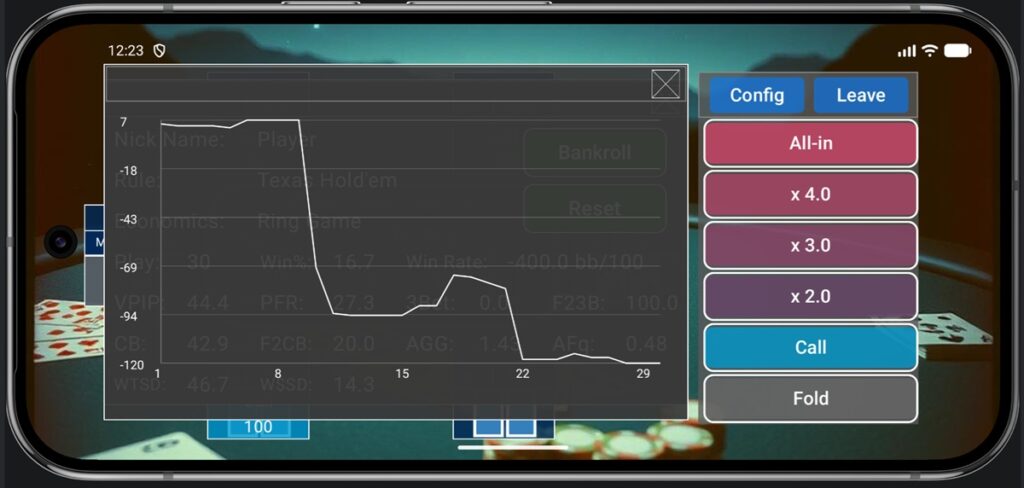
If the cumulative profit/loss graph is trending upward, it means you are gaining chips on average. Conversely, if it is trending downward, you are losing on average, indicating that you need to improve your playing style.
8. Fast Fold
In flop poker games like Texas Hold’em, once you fold, there is nothing to do until the next hand begins, so these games generally involve significant waiting time. To avoid this, when a player folds, the table is immediately closed and a new game begins, allowing play to continue without any waiting time. This mechanism is called “Fast Fold.” In this application, you can switch to Fast Fold mode by checking the Fast Fold checkbox that appears during the waiting period.
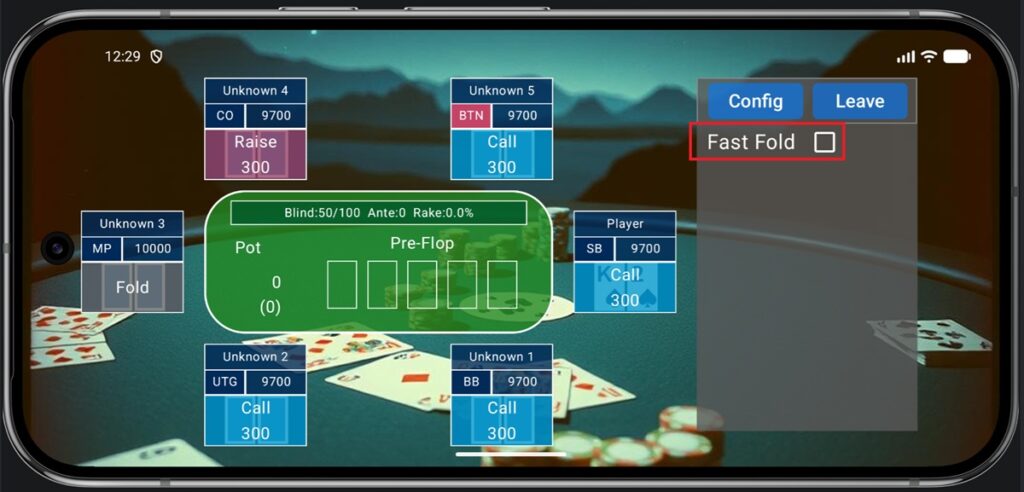
In Fast Fold games, your opponents are reset after each game, so your stack size is also reset to the default value each time. Player positions are assigned randomly each time. Unlike in regular games, since the stacks are reset each time, you should check the Bankroll screen on the HUD to see whether you are winning or losing. Fast Fold is ideal for players who are not interested in analyzing other players’ styles but want to play as many hands as possible in a short time to review their own play statistics and performance records.