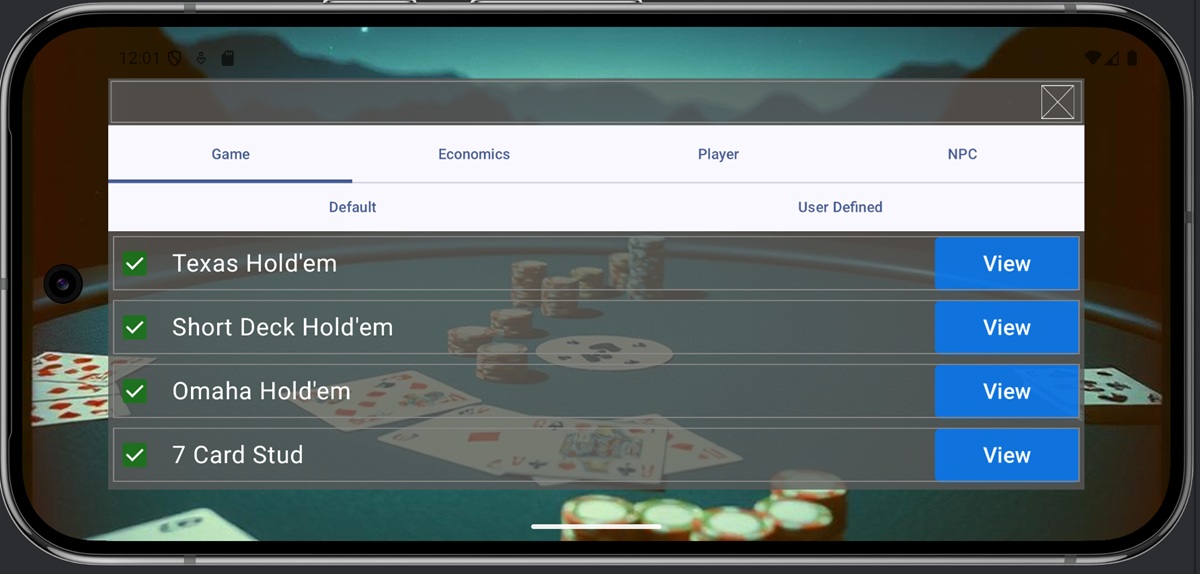
1. Game Settings Screen
This game offers various types of games based on different game components. Users can also modify game rules to play their own custom games. Game rules are composed of the following elements:
- Rule: Sets poker rules (such as cards used and hand types).
- Economics: Sets rules regarding chips in poker.
- Player: Configures the number of players at the table and NPC (AI) opponents.
- NPC: Configures the behavior rules for NPCs.
The Game Settings screen allows you to review the settings for the default games provided or define your own settings.

2. Default and User-Defined
Each screen consists of two tabs: Default and User Defined. Default rules are predefined by the system and cannot be changed by the user. You can view each setting by clicking the View button on the right side of each row. User-Defined rules are game rules freely defined by the user. Up to 30 settings can be freely defined for each component. Pressing the Edit button on the right side of each row launches the settings screen. How to configure each component is explained in Chapters 5 through 8.

3. Selecting Settings to Use
Because this game has a very large number of options for game components, displaying all possible selections in the game screen’s selection box could make operation difficult. Therefore, you can pre-set which items appear in the selection box via the game settings screen. Regarding default and user-defined settings, items with the left checkbox checked in each row will appear in the game screen’s selection box. Conversely, items you do not wish to use can be excluded from the selection box options by unchecking their checkboxes. Your checkbox selections are automatically saved when you close the game settings screen.
