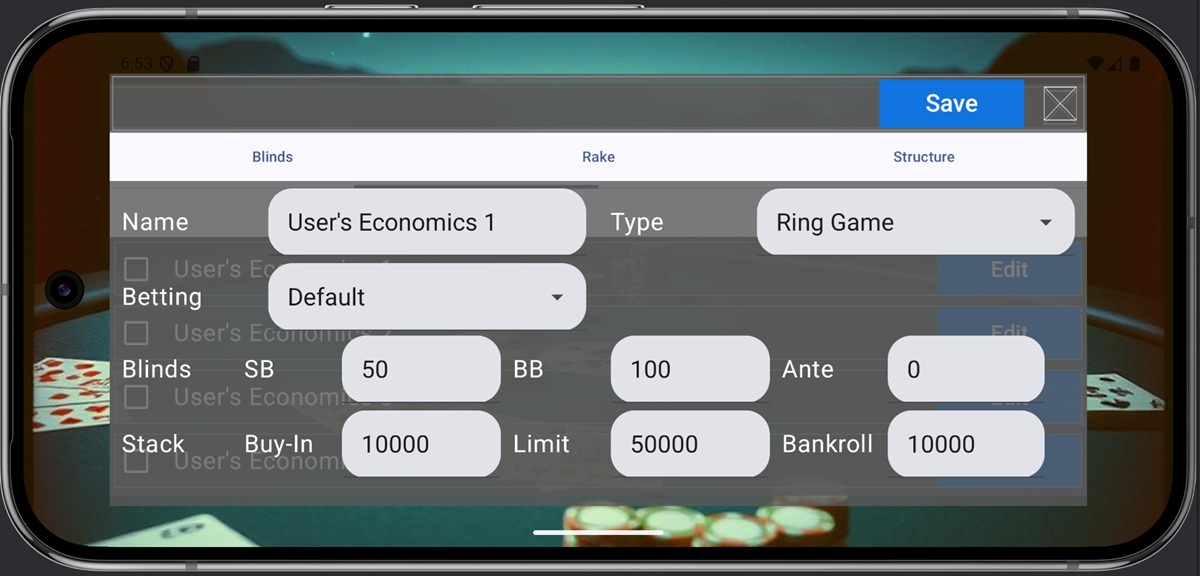
1. Economics Configuration
In poker, optimal strategies vary depending not only on game rules like blinds, antes, and rake, but also on chip limits and fees. Additionally, beyond games simply aiming to win chips, you can play tournaments (Sit&Go, MTT) where the goal is to survive in the game as long as possible. Economics Configuration configure these rules. The settings consist of the following three screens:
- Blinds: Sets basic rules concerning chips
- Rake: Sets rake and tournament rules
- Structure: Sets tournament progression rules
2. Blinds Screen

The Blinds screen sets the economic condition name, the basic rule structure, and the blind rules. The items on the screen are as follows:
- Name: The name of the economic condition. Duplicate names cannot be used.
- Type: Specifies the basic structure of the rules. The meaning of each option is as follows:
- Ring Game: A game simply aiming to win chips
- Sit & Go: A game competing for ranking based on how long you survive at a single table
- MTT: A game competing for ranking based on how long you survive across multiple tables. Multiplayer only.
- All-in or Fold: A Ring Game where actions are limited to All-in and Fold
- AOF Sit & Go: A Sit & Go where actions are limited to All-in and Fold
- AOF MTT: An MTT where actions are limited to All-in and Fold
- Betting: The betting method in the game is defined in the game settings (see Chapter 5), but you can override those conditions here. Set this when you want to force the game settings to AOF for a standard game, etc. Specify Default if you do not want to override. The meaning of each option is as follows.
- No Limited: Overrides the betting method to No Limited.
- Pot Limited: Overrides the betting method to Pot Limited.
- All-in or Fold: Overrides the betting method to All-in or Fold.
- Default: Applies the game settings’ betting method as is.
- Blinds: Set the amounts for SB, BB, and Ante
- Stack: Set the initial chip holdings, maximum holdings (resets to initial value upon reaching the cap), and the initial bankroll value for AOF
3. Rake Screen

The Rake Screen sets the basic rules for rake and tournaments. The meaning of each item is as follows.
- Rake: Sets the fee rate for Ring Games
- Rake Cap: Sets the maximum rake amount
- No Flop No Drop: Check this if no rake is taken when the game ends in the first round.
- Threshold: Sets the minimum pot size for rake collection. No rake is taken if the pot is smaller than this amount.
- Tournament: Sets basic tournament rules.
- Type: Defines the basis for leveling up the structure. Choose between Time (Minute) and Game Count (Play Count). MTTs use fixed Minute.
- Period: Sets the level-up interval. For example, a setting of 5 means leveling up every 5 minutes if Type is Minute, or every 5 games if Type is Play Count.
- Count: Maximum number of level-ups.
- Multiplier: Sets the speed at which blinds and antes increase. For example, a value of 2 means they double with each level-up.
- Generate: After setting the basic tournament rules, press the Generate button to create the structure data.
4. Structure Screen

The Structure screen allows you to review the generated structure data. The meaning of each item is as follows.
- Start: The condition for that structure to begin. If the Type is Minute and the value is 5, that level applies after 5 minutes.
- End: The condition for that structure to end. If the Type is Minute and the value is 10, that level ends after 10 minutes.
- SB, BB, Ante: The quantity of blinds and antes applied
- Buy-in: The stack amount for AOF games.
- Game: In this game, you can change the game played each time the structure levels up. If nothing is set, the game settings rules apply. Setting this item overwrites and sets the game rules. Setting this item allows you to play multiple games within a single tournament. As the default economic condition setting, there is a “AOF S&G Variant” setting, and the meaning of this condition is as follows.
- Up to Level 3: Play AOF pre-flop, similar to standard Texas Hold’em.
- Levels 4–6: Play AOF with cards exposed until the flop.
- Levels 7 and above: Play AOF with cards exposed until the turn.
5. Saving Settings
The screen settings above are saved by pressing the “Save” button. Closing the screen without pressing “Save” will discard all edits.