1. Player Configuration
In this game, opponents are NPCs (AI). You can configure the number of players seated at the table and the types of NPC behavior patterns you face. These settings are configured in the Player Config screen.
2. Player Config Screen

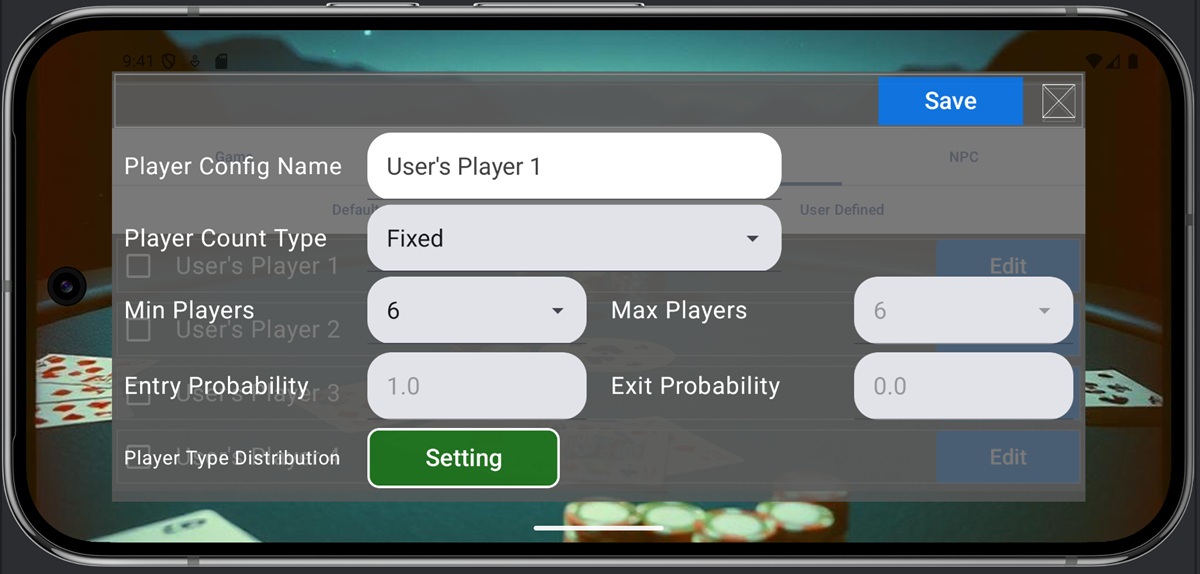
The items on the Player Config screen are as follows.
- Player Config Name: The name of the player configuration. Duplicate names cannot be used.
- Player Count Type: Sets the number of players seated at the table. The meaning of each option is as follows:
- Fixed: Play with a fixed number of players. NPCs who lose chips and leave are immediately replaced.
- Float: NPCs join or leave with a probability. NPCs who lose chips and leave are not necessarily replaced.
- Min Players: The minimum number of players seated at the table. If the player count falls below this, NPCs will always be added to fill the gap.
- Max Players: The maximum number of players seated at the table. NPCs will not join if the player count exceeds this.
- Entry Probability: Represents the probability NPCs will join the game. A higher value means more NPCs will join.
- Exit Probability: Represents the probability NPCs will leave the game. A higher value means NPCs will leave more frequently.
3. Player Type Distribution

Player Type Distribution sets the ratio at which NPC types are selected. Choices are selected from the players defined in NPC Settings. When there is only one option available, the same type of NPC will always be selected. The number on the right of each row represents the ratio at which that NPC Type appears. If the total is not 1, it will be automatically normalized to 1, so you can input ratios. Inputted content is automatically saved to memory when the screen is closed.
4. Saving Settings
The above screen settings are saved by pressing the ‘Save’ button. Closing the screen without pressing “Save” will discard all edited content.