1. Multiplayer Functionality

In addition to games against NPCs, this game offers functionality for players to compete against each other via the server (multiplayer functionality). The multiplayer functionality consists of the following features.
- Notice: Displays notices from the service provider, such as server maintenance information.
- Recruitment: Allows you to specify game rules and recruit participants.
- Search: Search for ongoing games and apply to join.
- Matching: Automatically search for and apply to join games matching specified criteria.
- Watch: Watch ongoing games (excluding MTTs).
- MTT Ranking: View the final rankings at the conclusion of MTTs.
- Return to Menu: Return to the main menu screen.
2. Notice Screen

Unlike other features, the multiplayer function requires a server running to share data. It cannot be used when the server is down for maintenance or updates. Therefore, this screen will display advance notifications about server downtime. It will also notify you here if there are planned games (like MTTs with large numbers of players) that only the service provider can run, using AI. Pressing the “Detail” button on each line displays the full notification content.
3. Recruitment Screen

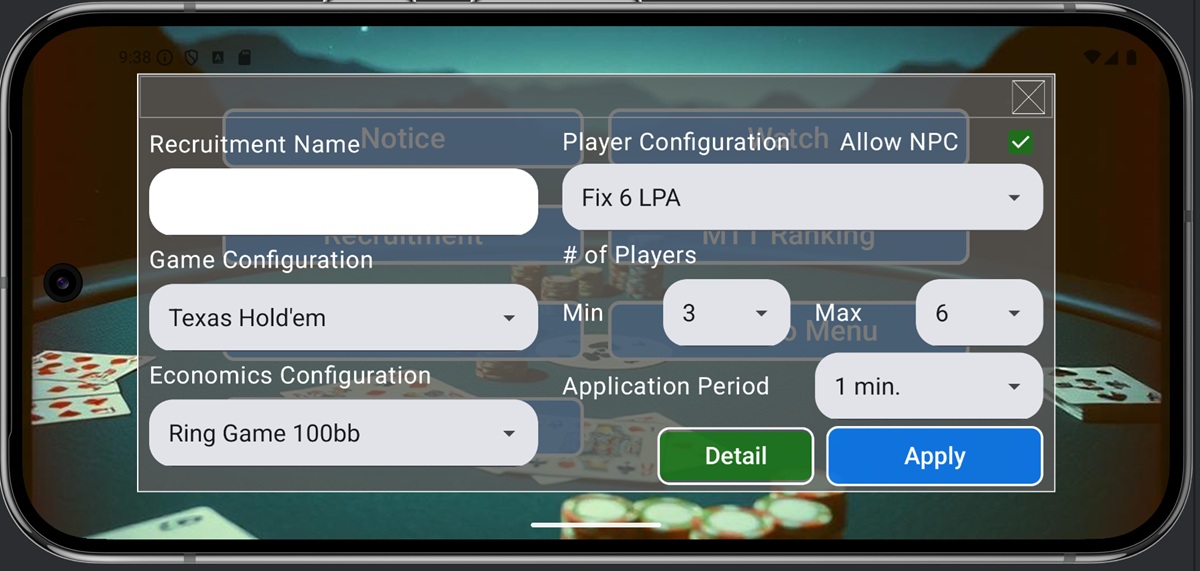
In this game, multiplayer games are primarily initiated through user recruitment (though some are automatically generated by servers or organized by the service provider). Players can recruit others by specifying game rules and economic conditions. Recruitment is initiated by configuring settings on the recruitment screen and submitting them to the server.
The meaning of each item on the Ring Game and S&G recruitment screens is as follows.
- Recruitment Name: A name to distinguish your recruitment from others. We recommend using a name that clearly describes the recruitment content.
- Rule Configuration: The rules for the game to be played. You can choose either the default rules or user-defined rules.
- Economics Configuration: Rules defining the chips used in the game.
- Player Configuration: If you want to include NPCs among participants, check “Allow NPC” and set the Player Configuration. If this setting is enabled, the game will start automatically with NPCs filling any unfilled player slots, even if the recruitment target isn’t met.
- # of Player: Sets the upper and lower limits for the number of players.
- Application Period: Set the recruitment period. If the target number of players is not reached by the end of the period, recruitment is canceled. If the target number is reached, the game starts.
The recruitment period can be configured in more detail. You can shorten the period as more players join, or set the game to start once the target number is reached, even if the recruitment period hasn’t ended. Clicking the Detail button displays the following screen.

If Early Start is checked, the game will start once the maximum number of players is reached. To shorten the recruitment period as more players join, enter a specific number of seconds in Waiting Time. For example, if recruitment starts at 1 minute (60 seconds), and the screen settings show 45 seconds or more remaining while 3 players have joined, the recruitment period will be shortened to 45 seconds. The above screen settings mean the recruitment period shortens to 30 seconds for 4 players and 15 seconds for 5 players.
On the recruitment screen, setting the economic condition to MTT changes the input fields. The meaning of each field on the MTT recruitment screen is as follows.

- Max Players per Table: Maximum number of players per table in MTT
- Allow Re-Entry: Specifies whether re-entry is permitted and, if so, the maximum number of times allowed
- Time: The left value indicates the period until the game starts, while the right value represents the recruitment end time. In the screen settings, the game starts 5 minutes after recruitment begins and accepts late registration and re-entry until 10 minutes later.
4. Search Screen

The Search Screen allows you to search for currently open recruitment conditions. For games with standard rules (where game settings and economic conditions are set to default), if no recruitment is found, the server automatically creates one and displays the results on the screen. The screen items are as follows:
- Recruitment Name: A name to distinguish this recruitment from others. We recommend using a name that clearly describes the recruitment content.
- Rule Configuration: The rules for the game to be played. You can select either the default or a user-defined game.
- Economics Configuration: The rules defining the chips for the game to be played.
- # of Player: Sets the upper and lower limits for the number of players.
- Allow NPC: Check this if participants may include NPCs.
Clicking the “Apply” button on the left side of each row in the search results screen submits an application to join that recruitment. After applying, you will be redirected to a waiting screen until the recruitment is filled. Please wait until matched. When matched, a participation confirmation pop-up will appear; selecting “Yes” will take you to the game screen (for MTTs, you will be automatically redirected to the game screen without a pop-up).
5. Matching Screen

The Matching Screen is a simplified version of the Search Screen process, automatically applying to join searches (and recruitment with high participant counts) initiated on the Search Screen. Each screen item functions identically to the Search Screen. Clicking the Apply button submits your application to join that recruitment. After applying, the screen transitions to a waiting screen until recruitment is finalized; please wait until matched. Upon matching, a confirmation popup appears asking if you wish to join; selecting “Yes” transitions you to the game screen (For MTTs, the game screen opens automatically without a pop-up).
6. Watch Screen

For Ring Games and S&G, you can spectate games already in progress (watch the game unfold). Select a game you wish to spectate from the search results list (set conditions to search), then press the “Watch” button. This opens a screen identical to the normal game screen, allowing you to watch the game progress (Each player’s hand is displayed face down). To stop spectating, press the “Leave” button to disconnect from the server and exit the game screen.
7. MTT Ranking Screen

In S&G, you can see your ranking when the game ends. However, in MTT, losing disconnects you from the server, so you cannot see your final ranking at the end of the game. Therefore, after all rankings in an MTT are finalized, you can view your confirmed ranking from the MTT Ranking screen. Finalized rankings are stored in the server database for 24 hours and can be checked on the MTT Ranking screen. In addition to your own ranking, you can see the nicknames of the top 10% of players (minimum 10 players, maximum 50 players).
8. Multiplayer Function Notes
The multiplayer function stores gameplay data such as hands, action history, and win/loss results on the server database (as stated in Article 2, Section 4 of the Terms of Service). This application does not collect any personal information, so the service provider cannot know who is playing or how they are playing. However, please be aware that user action history may potentially be used as training data for developing poker AI algorithms in the future.
Additionally, recruitment names and player nicknames can be freely entered as text of approximately 15 to 30 characters. Please refrain from entering text that may be offensive to other players. Input content is stored linked to an anonymous ID. Please note that if a user repeatedly uses problematic text, their anonymous ID may be deleted from the registry, preventing them from using the multiplayer feature.